

Add IP exception for fail2ban
Q. How can I stop fail2ban from blocking my own IP (from Frepbx, for example)
A. You can do that by adding your IP address to /etc/fail2ban/jail.conf
Within /etc/fail2ban/jail.conf locate this variable and add either the IP address or a range:
ignoreip = 127.0.0.1/8 172.16.0.0/24
Firefox - all addons disabled (66.0.3)
 As you have probably noticed, all your addons have been disabled with the latest firefox update (66.0.3), with this error message: extensions "could not be verified for use in Firefox and has been disabled". This is because Mozilla foundation is cracking down on extensions with obfuscated code. (Link for more reading)
At the time of this writing, there's only a temporary solution, which allow to re-enable the addons per-session. Once a more permanent solution is found, it will be posted here:
Firefox disable push notifications
Not sure who came up with web notifications, because we are still yet to find a useful use for them (no, calendar notification from google apps is not a valid reason).

To disable them completely go to Options:
Change hostname in Ubuntu 18
 In Ubuntu 18.04, when you update the /etc/hostname, the name doesn't stay after the reboot. Why that doesn't work anymore is a story for another day. What we are interested in now is changing the hostname to something that survives the reboot. Note that as any other admin command, you either have to run as sudo or root.
To check the current hostname, run the following command:
hostnamectl
It will display, among other things, the current hostname:
Stop programs from starting automatically on boot in Windows
There are many instances when programs are starting when the computer boots, bring annoying pop-ups and consuming resources. Most of them have a way to disable that feature, some of the more poorly designed ones do not. There's a way to disable it, using an configuration application called msconfig. It exists in all modern Windows versions:
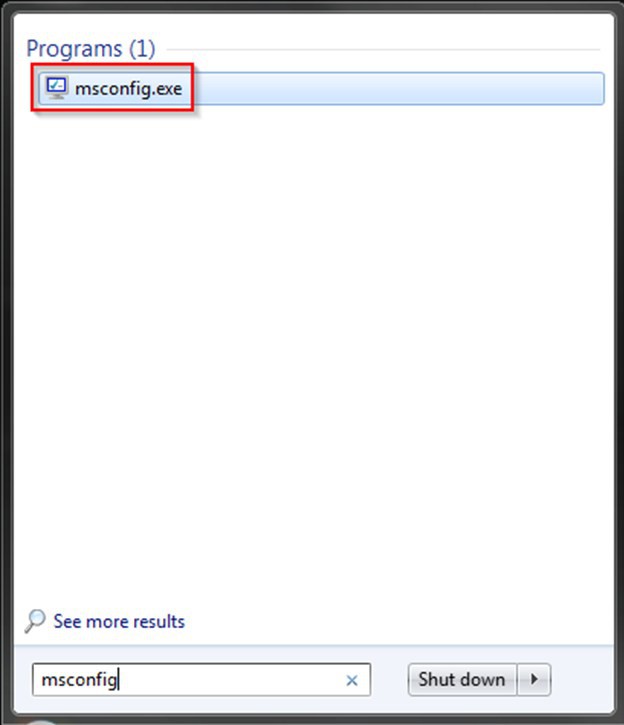
Go to Startup Tab and uncheck any application you don’t want to launch during boot time. Click Apply and then OK.
Configure network in Ubuntu 18
 The network configuration has changed in Ubuntu 18 from all the previous versions. The new version uses Netplan and it is somewhat harder if you don't know yaml. The discussion for pros and cons of this move by Ubuntu can be infinite (why change what's working; this is a tool, I don't want to learn the new ways, etc.), but this is a quick tutorial for quickly changing the IP address. (There's lot of information on Netplan and various things one can do with it)
The network configuration files are located in /etc/netplan. Configuration file can be opened as below:
vim /etc/netplan/50-cloud-init.yaml
With comments removed, this is the configuration data for a simple DHCP setup:
Bash: determine if the week is odd or even
We regularly post scripts and script snippets that we have found useful in our day-to-day IT support tasks. Here's a quick way to help determine if the week is odd or even using a bash script. You can replace the echo "even" and "odd" with whatever functions you are looking to perform, such as weekly backups for example. Although not tested, this script should also work on any version of Apple's Mac.
Copy and paste this into a file:
More Articles...
Page 1 of 21
<< Start < Prev 1 2 3 4 5 6 Next > End >>